Excel-to-PowerPoint Updates
Update PowerPoint documents based on data from Excel workbooks.
- Reliably update hundreds of text, ranges and tables in seconds
- Use links that don't break when you change file names or location or when you share with others
“Excel-to-PowerPoint Updates” is a feature included in the Excel-to-Word Document Automation Add-In.
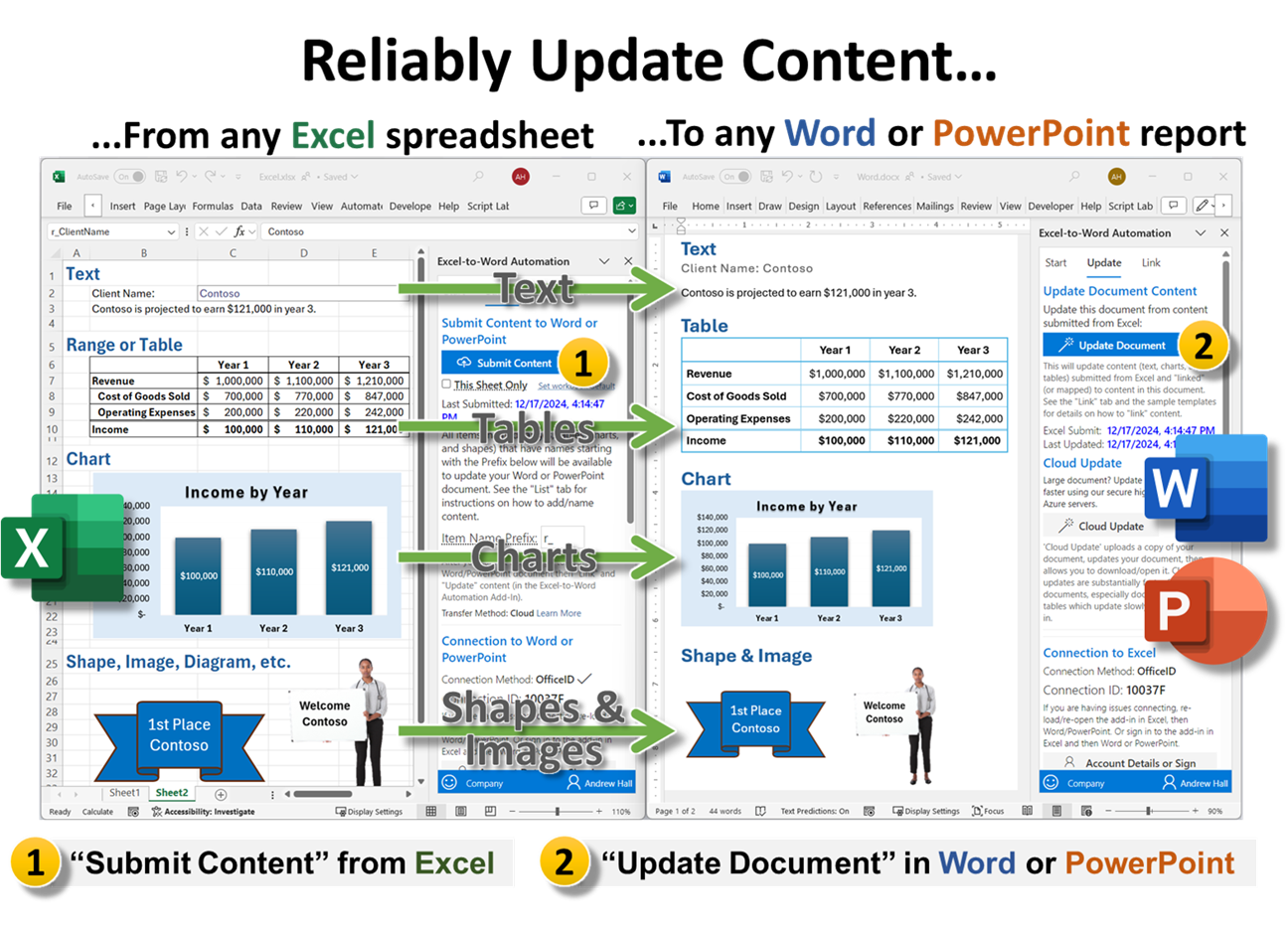
“Excel-to-PowerPoint Updates” enables you to: 1) submit values from named text, ranges, and tables from an Excel workbook. Then, 2) update data in matching linked shapes (text, ranges, tables, charts, and more) in PowerPoint documents.
Excel-to-PowerPoint Document Automation
Update PowerPoint documents from content in your Excel workbooks using robust portable links.
Automate your customer proposals, recurring business/financial reports, assessment results, data-intensive contracts, and more!
The add-in is successfully used by many individuals and small to large organizations to improve productivity and document quality.
Quick/secure install via the Microsoft Office Store.
Works with Office for Windows and Office for Mac
Requires Microsoft Office 365 (Subscription Version) or Office 2019 or newer
We highly recommend starting with the "Insert Sample Content" on the "Start" tab of the add-in. It contains a detailed guide on how to link content.
How It Works
Link Excel-to-PowerPoint once, then update many times
- Name your content in Excel: Select and name the cells, ranges, tables, shapes, or charts you want to use.
- Link your content in PowerPoint: Connect your PowerPoint content to your named Excel items.
- Update anytime: After making changes in Excel, click Update from either Excel or PowerPoint.
How to Link Content
What's New: Simpler Linking
We've streamlined how your documents connect.
- Use the new Create Link button on the Link Tab of the add-in in Excel.
- Links immediately become available in the add-in in Word and PowerPoint.
- No more submitting changes.
- Update linked content directly from Excel or Word/PowerPoint with just one click
Linking content from Excel to PowerPoint is easy. You can link text, tables, charts, images, and more. The add-in uses a simple naming convention to link content. You can link content from Excel to PowerPoint in a few simple steps.
View the tutorial to see how:
Other linking instructions can be found:- In Excel: on the List Tab, under “How to Name Content”
- In PowerPoint: on the Link Tab
Common Use Cases
- Financial Presentations: Automate charts, revenue trends, and budget forecasts from Excel.
- Sales Reports: Populate slides with sales metrics and performance data stored in Excel.
- Monthly Performance Dashboards: Use Excel data to update KPI graphs and summaries.
- Investor Pitches: Import financial projections or valuations directly from Excel spreadsheets.
- Project Updates: Populate timelines, milestones, and resource tracking automatically.
- Business Proposals: Include cost breakdowns and pricing structures from Excel files.
- Training Presentations: Add tables of scores, progress stats, or survey results.
- Product Launch Decks: Integrate market analysis or sales forecasts.
- Marketing Strategy Decks: Use campaign performance data to generate charts.
- Operational Reviews: Automate slides for resource utilization or process efficiency metrics.
- Team Performance Reports: Show individual or team metrics from Excel.
- Budget Approvals: Add expense summaries and financial comparisons.
- Board Meeting Reports: Create high-level overviews directly from Excel data.
- Risk Assessments: Import matrices and tables from Excel for visual presentation.
- Customer Feedback Presentations: Display satisfaction scores and survey results.
- Compliance Reporting: Include audit results or other data summaries.
- Supply Chain Presentations: Automate inventory or logistics data visualizations.
- Education Workshops: Use data-driven slides for progress or participation.
- Employee Reviews: Summarize team growth metrics or deliverables from Excel.
- Event Planning Decks: Create schedules and vendor lists dynamically.
- Procurement Presentations: Import comparison tables or cost analyses.
- Grant Proposal Decks: Add budget plans and funding allocation directly from Excel.
- Market Research Presentations: Generate charts from statistical analysis.
- Academic Research Reports: Pull experimental results or analysis data into slides.
- Industry Trends Presentations: Automate insights and data visualizations from Excel sheets.
- Product Performance Reviews: Visualize specifications and sales stats.
- Healthcare Reports: Add medical test results or patient statistics.
- IT Performance Reviews: Automate data about system uptimes or user analytics.
- Retail Analysis Decks: Integrate store-wise sales metrics.
- Service Delivery Reports: Show efficiency or SLA adherence metrics.
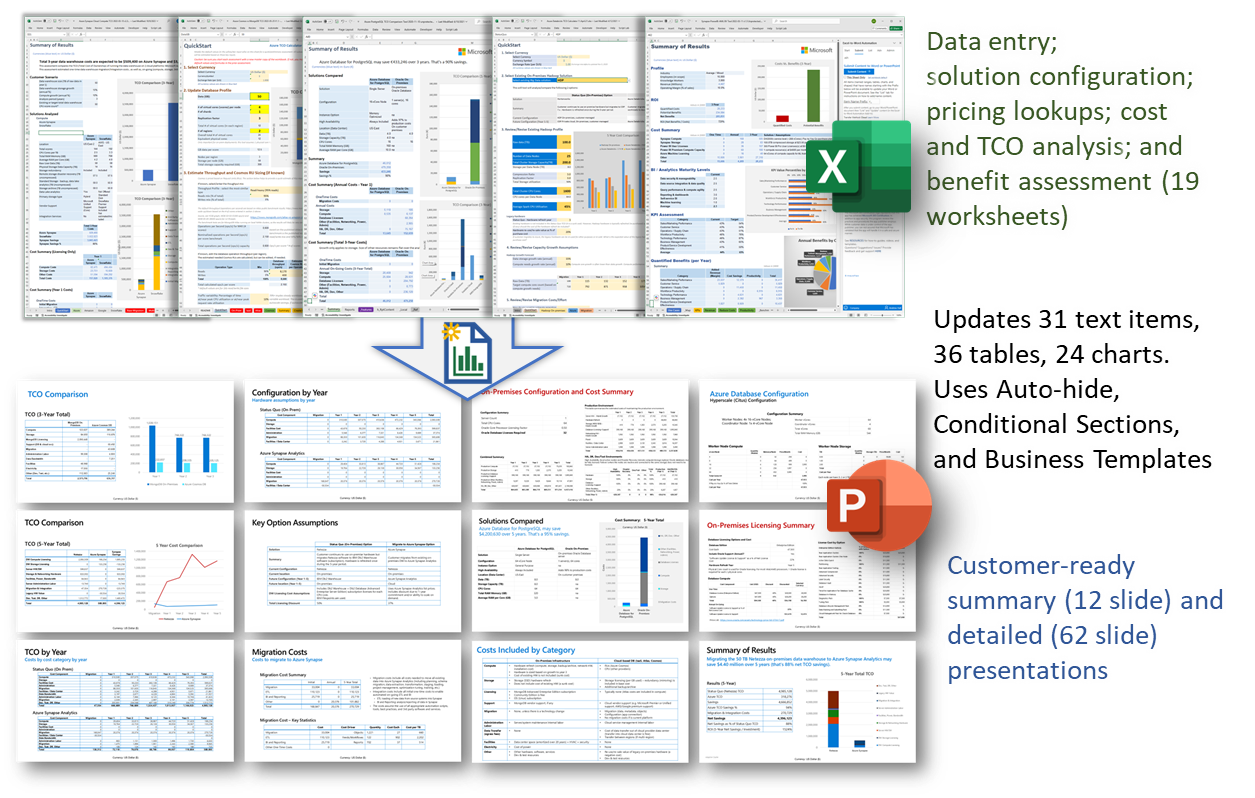
Example Customer Use Case: Solution Configurator and Proposal Generator